Add armour to a sprite
Got a hero and a piece of armour? Upload both to Merge and add the item to the base sprite. The base stays untouched outside the added item. It works for other pairs too, such as a gem on a sword. Merge is available to subscribers and is still in testing.
MERGE TWO SPRITES Subscribers. IN TESTING. 2 credits per variant on Epic, 6 on Mythic.
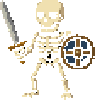
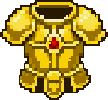
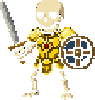
Two uploaded sprites and the result: gold armour on a skeleton warrior.
Bring the sprite and the item
- Upload a base sprite: the character or object you want to add something to.
- Upload an item sprite: armour, a hat, a weapon, a gem, or another item.
- Compare up to six variants and choose the result you want to keep.
Keep the base you already have
The added item is the change. Pixels outside it stay as they were in the base sprite. You can try a new piece of equipment without replacing the character's face, pose or other details.
More than armour
Merge accepts any pair of base and item sprites. Put a gem on a sword, or add a hat to a character. You supply the item, so it is useful when you already have an inventory sprite you want to see on something else.
Need the items first? The game asset pack generator can make a matching set of weapons, equipment or props.
Frequently asked questions
Do I need to upload the armour as well as the character?
Yes. Merge takes two sprites: a base and an item to add. For armour, upload the character as the base and the armour as the item.
Does Merge only work with characters?
No. The base can be another object. A gem on a sword is one example; armour, hats and weapons on characters are others.
Will Merge change the rest of my base sprite?
Pixels outside the added item stay untouched. Merge keeps the rest of the base sprite as you uploaded it.
How many variants can I make at once?
Up to six variants in one request. Each variant is charged separately.
How much does Merge cost?
2 credits per variant on Epic, or 6 on Mythic. Six variants cost 12 credits on Epic or 36 on Mythic.
Is Merge available on the free plan?
No. Merge in the app is a subscriber mode, available on Ranger, Knight, Paladin and Dragonlord.
Why is Merge labelled IN TESTING?
Merge is available to subscribers but is still in testing. Check each result before using it in your game, and share feedback through the SpriteLab Discord.
Try it on your own game
Bring your base sprite and the item you want to add.
MERGE TWO SPRITES Subscribers. IN TESTING. 2 credits per variant on Epic, 6 on Mythic.