Isometric sprite generator
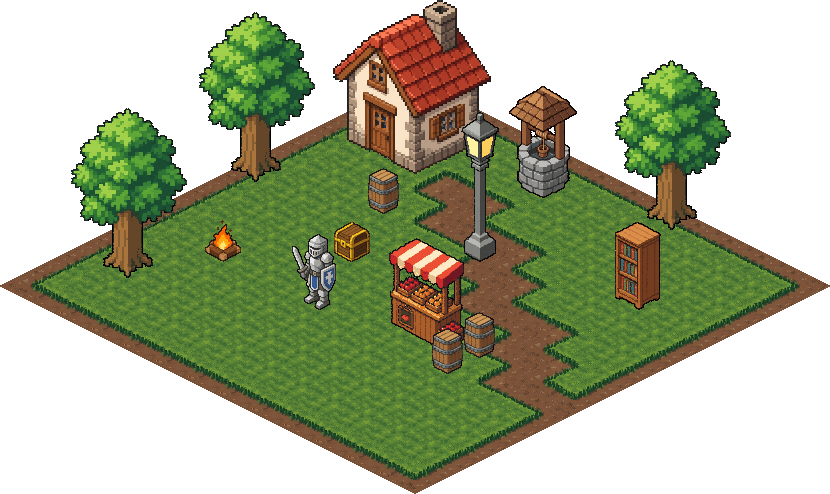
Type what you want and get an isometric pixel art sprite that actually sits on a 2:1 tile grid. Props, buildings and characters all come out at the same real-world scale, so a knight stands next to a cottage at the right size and everything lines up when you drop it on a map.
MAKE ISO SPRITES 25 free credits + 5 a day. No card needed.
Why most AI iso art doesn't line up
Ask a normal image model for "isometric" and you get a mix of true iso, three-quarter views and random sizes. It looks fine on its own, then falls apart the second you put two sprites on the same map: the angles disagree, the barrel is the size of the house, and nothing sits on a tile.
SpriteLab draws every iso sprite to a fixed 2:1 guide on our own pixel grid, so the angle is the same every time. Each sprite is then scaled to real-world height, so sizes are consistent across a whole set.
How it works
- Turn on Isometric in Text to Sprite and describe the object: "wooden market stall with a striped awning".
- Pick a footprint and height (1x1 up to 3x3 tiles), or leave both on Auto and SpriteLab works them out from the prompt. A barrel comes out small, a cottage takes 2x2.
- Download the PNG plus its anchor. The anchor is the exact floor point to snap the sprite to a tile in your engine. If the height isn't quite right, change it on the result for free, no new generation.
Packs and rotations
Iso packs: turn on Sprite pack as well, type a theme like "alchemist laboratory", and get 4 or 6 matching props in one go, each planned with its own footprint and height. Save them all, or download one sheet with every prop's floor point.
Iso rotation: turn on Rotation for a character and get four facings (SE, SW, NW, NE) at the same scale, standing on the same floor point, so it turns in place on the map.
Build the ground too
Props need somewhere to stand. Tileset mode has an isometric switch that makes a full autotile set of 2:1 diamonds, with optional raised blocks and cliff sides. See the AI tileset generator.
Frequently asked questions
What size are the isometric tiles?
Iso sprites are built on a 64x32 or 32x16 tile, the standard 2:1 isometric diamond. Pick the tile size that matches your map and every prop is sized for it.
Do sprites from different generations match in scale?
Yes. Every iso sprite is scaled to real-world height on the same tile unit, so a person, a barrel and a house made on different days still sit together at the right sizes.
How do I place an iso sprite on my tile map?
Each sprite comes with an anchor: the floor point at the centre of its base. Snap that point to the tile position in Godot, Unity, Tiled or your own engine and it sits on the grid.
Can I keep a consistent style across iso assets?
Yes. Make one sprite you like, hit Match this style, and later sprites (iso included) reuse its palette, outline and shading.
How much does it cost?
An iso sprite costs the same as a normal sprite: 1 credit (6 on the higher-detail model). A pack of 4 or 6 props is 2 credits and a 4-direction iso rotation is 4. Guided iso props, packs and rotation are part of the paid plans; free accounts can still use the basic isometric view.
Try it on your own game
Clean 1px outlines, limited palettes and transparent PNGs, ready for your engine.
MAKE ISO SPRITES 25 free credits + 5 daily. No card needed.