9-slice game UI: how it works in Godot, Unity and CSS
Almost every panel and button in a game is a small image drawn at many sizes. 9-slicing is how that works without the corners turning to mush. Here's what it is, how to set it up in each engine, and the mistakes that make UI look cheap.
What 9-slice actually does
Draw four lines across your image, two vertical and two horizontal. That gives nine regions. When the image is resized:
- The four corners never scale. They stay pixel-for-pixel what you drew.
- The top and bottom edges stretch horizontally only. The left and right edges stretch vertically only.
- The centre stretches both ways (or tiles), and fills whatever is left.
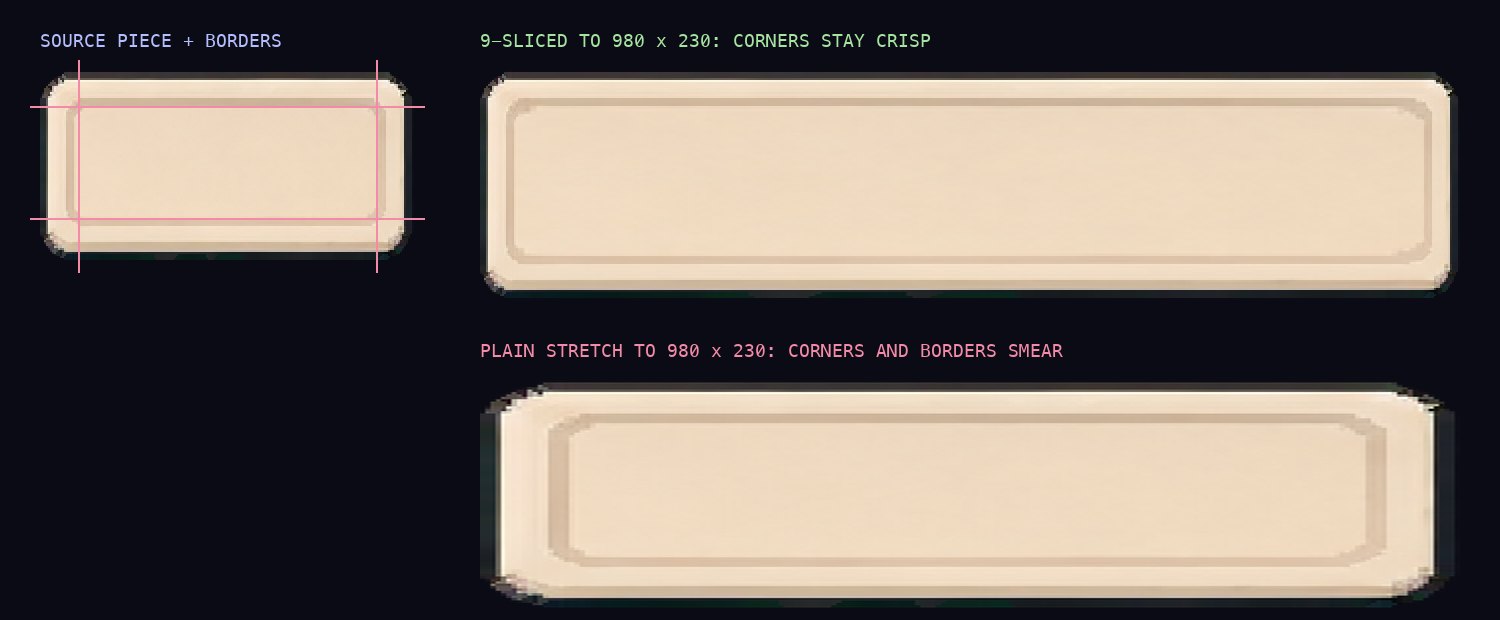
The four numbers you set are the border widths: left, top, right, bottom, in pixels of the source image. Same idea, different names: Godot calls them patch or texture margins, Unity calls it the sprite border, CSS calls it border-image-slice.
Godot 4
Two ways, depending on what the image is for.
A one-off panel: add a NinePatchRect, set its texture and the four patch_margin_* values. Set axis_stretch_horizontal and axis_stretch_vertical to Tile if the edge has a pattern.
Buttons and panels across the whole game: make a Theme, and give each button state (normal, hover, pressed, disabled, focus) a StyleBoxTexture with the same texture margins. Every Button in the scene then picks it up.
var sb := StyleBoxTexture.new()
sb.texture = preload("res://ui/button_normal.png")
sb.texture_margin_left = 12
sb.texture_margin_top = 10
sb.texture_margin_right = 12
sb.texture_margin_bottom = 14
add_theme_stylebox_override("normal", sb)
For pixel art, set the project's default texture filter to Nearest (Project Settings, Rendering, Textures), or it blurs. More on that in using pixel art in Godot 4.
Unity
- Select the sprite, open the Sprite Editor, and drag the green border handles, or type the L, T, R and B values. (If you set it from a script,
spriteBorderis ordered left, bottom, right, top.) - On the UI
Image, set Image Type to Sliced (or Tiled for patterned edges). Leave Fill Center on unless you want a hollow frame. - If the borders come out too thick or thin on screen, change Pixels Per Unit Multiplier on the Image rather than redrawing.
- For buttons, set the Button's Transition to Sprite Swap and assign the highlighted, pressed, selected and disabled sprites.
Pixel art also wants Filter Mode Point and Compression None on the import settings. The Unity guide has the rest.
Web (CSS)
CSS has 9-slice built in as border-image. The slice values go top, right, bottom, left (the CSS order), and fill keeps the centre.
.panel {
  border: 18px solid transparent;
  border-image: url(panel.png) 18 19 22 19 fill / 18px 19px 22px 19px stretch;
  image-rendering: pixelated; /* pixel art only */
}
The mistakes that make UI look cheap
- Borders too thin. If the line cuts through a corner's bevel or ornament, half the corner stretches and you get a lump on every edge. Put the line just past the last detail.
- Different borders across states. If the hover sprite's border is 2 px wider than normal, the content inside jumps when you mouse over. Keep one set of borders for the whole button family.
- Stretching a pattern. Rope, chains, rivets and brick go wavy when stretched. Tile those edges instead.
- A centre ornament. A plaque with a crest in the middle smears when 9-sliced. Split it: a plain 9-slice behind, and the crest as a separate fixed-size image on top.
- Painted HD textures. A parchment or wood grain centre stretched to five times its size looks blurry. Either tile the centre, or keep that piece at a fixed size.
- Non-integer scaling on pixel art. 1.5x makes some pixels two wide and some one. Scale pixel UI by 2x, 3x, 4x, and multiply the borders by the same amount.
Frequently asked questions
What is 9-slice scaling?
9-slice (also called nine-slice or nine-patch) splits a UI image into a 3x3 grid with four border lines. The corners never scale, the edges stretch in one direction, and the centre stretches in both, so one small panel can be drawn at any size without blurring its corners.
How do I 9-slice in Godot 4?
Use a NinePatchRect node and set its patch margins, or put a StyleBoxTexture in a Theme and set its texture margins. The theme route is the one to use for buttons and panels, since each button state gets its own StyleBox.
How do I 9-slice in Unity?
Set the border (left, bottom, right, top) on the sprite in the Sprite Editor, then set the UI Image's Image Type to Sliced. For buttons, use the Sprite Swap transition and give each state its own sprite with the same borders.
Should borders stretch or tile?
Stretch for flat colour and simple bevels, tile for patterned edges like rope, chains or brick, where stretching visibly distorts the pattern.
Does 9-slice work for pixel art?
Yes, as long as you scale by whole numbers and use nearest-neighbour filtering. The borders scale with the art, so a 6 px border at 3x is 18 px.
Skip the slicing
Describe a screen, get a full UI kit with the borders already set for Godot and Unity.
BUILD A UI KIT 25 free credits + 5 daily. No card needed.