Pixel art walk cycle generator
Updated 2 November 2026
Give it one sprite, ideally side-on, type "walk cycle facing right", and get a looping walk back as a sprite sheet and a GIF. The colours and outline match the sprite you started with, and you can cut bad frames or change the speed afterwards without paying again.
MAKE A WALK CYCLE 25 free credits + 5 a day. No card needed.
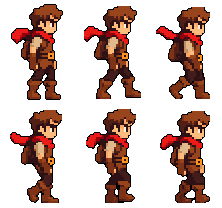

What you get back
A horizontal sprite sheet with every frame the same size, an animated GIF, and single frames if you want them. This is the adventurer's sheet as it came out, with nothing edited by hand:

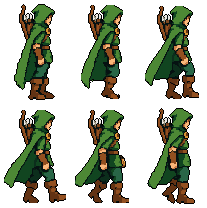
The adventurer and the ranger each started as a single sprite made in SpriteLab from a prompt, with the facing set to right. Each walk took about 20 seconds.
How to make one
- Start with a side-on sprite. Make one in Text to Sprite with the direction set to right, or upload your own PNG. Front-facing sprites can walk too, but side views give the clearest stride.
- Leave room. Pad the canvas a little at the sides so feet and capes don't clip. There are one-click presets for it.
- Describe the walk. "walk cycle facing right" is enough. Add one detail if it matters: "scarf sways", "cloak swings behind him", "heavy, slow steps".
- Pick the frame count. 8 is the default and right for most walks. Use 4 or 6 for tiny sprites, up to 16 for a slow, smooth stride.
- Check the loop. Play it, switch off any frame that pops, set the speed, then export the sheet, the GIF or single frames.
Prompts that work for walks
- Say the facing. "facing right" matches the sprite and stops the model turning the character mid-walk.
- Keep it short. One motion and one detail. Long prompts tend to add moves you didn't ask for.
- Name what should sway. Hair, scarves, capes and tails look better when you mention them.
- Use the standard engine. For idles and walk cycles it usually looks better than Pro and costs 10 credits less. Pro is for attacks, spells and sprites over 256 pixels.
Walks in four directions
Top-down and RPG games need the walk from the front, back and both sides. Make a 4 direction rotation of the character, then use Animate Directions: every facing walks with the same timing, and the mirrored side is a flip of the animated one, so left and right always match.
Using it in your engine
In Godot 4, add an AnimatedSprite2D, open its SpriteFrames, add frames from the sprite sheet and set the horizontal count to your frame count. In Unity, set the texture to Sprite Mode Multiple, slice by cell count and drag the frames into an animation clip. In both, use nearest or point filtering so the pixels stay sharp. Step by step: Godot guide, Unity guide. To preview a sheet or set a pivot first, the free pivot editor and sprite sheet to GIF tools work on any sheet.
Frequently asked questions
How many frames should a pixel art walk cycle have?
Eight is the usual number and SpriteLab's default: enough for a smooth stride without a huge sheet. Small sprites read fine at 4 or 6, and you can go up to 16 for a slow, smooth walk. Frame counts are even, so the two halves of the stride match.
Can I make a walk cycle from my own sprite?
Yes. Upload a PNG of your character to Animate and type something like "walk cycle facing right". The walk comes back in your sprite's own colours with the outline rebuilt, so it still looks like your art. Side-on sprites give the cleanest walks. More on animating a sprite from an image.
Can it make a walk cycle in four directions?
Yes. Make a 4 direction rotation of the character first (from a prompt or your own upload), then use Animate Directions so every facing walks with the same motion and timing. Mirrored sides are flips of the animated side view.
How much does a walk cycle cost?
20 credits on the standard engine, which is the one we recommend for walks and idles. The free plan gives 25 credits plus 5 a day. Trimming frames, changing the speed and retuning the outline and cleanup afterwards are free.
What sizes can I animate?
Sprites up to 256 pixels on the long side (320 on Pro), with an aspect ratio between 1:2 and 2:1. Most walk cycles are 32 to 128 pixels tall.
Will the walk cycle work in Godot or Unity?
Yes. The sheet is one row of equal frames on a transparent background, so in Godot you add it to an AnimatedSprite2D's SpriteFrames with the frame count, and in Unity you slice it by cell count in the Sprite Editor. Set filtering to nearest or point so it stays sharp.
Make your character walk
Upload a sprite or make one, then type the walk.
MAKE A WALK CYCLE 25 free credits + 5 daily. No card needed.