Animate a sprite from an image
Updated 2 November 2026
Already have the art? Upload a PNG of your sprite, say what it should do, and get a looping animation back as a sprite sheet and a GIF. Your colours stay your colours, the outline is rebuilt, and you can cut frames or retune the cleanup afterwards for free.
UPLOAD A SPRITE 25 free credits + 5 a day. No card needed.
 →
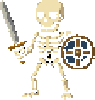 →
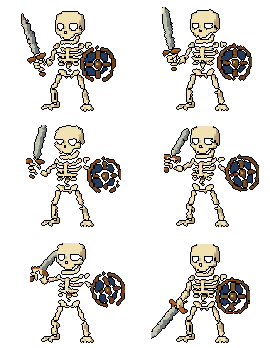
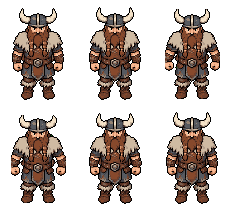
Both are real results. The viking is exactly as it came out. On the skeleton we switched off two frames where the shield smeared mid-swing, which takes one click each in the viewer, and the swing still reads.

How it works
- Upload your sprite. A PNG works best, with a transparent or plain background. Anything you made in SpriteLab can go straight in with one click too.
- Give it room. Drag the canvas edges or use a preset (Tight, + Sides, + All, + Tall) if the motion needs space, like a sword swing or a jump.
- Describe the motion. "idle breathing", "walk cycle facing right", "casts a fireball". Short prompts get an optional rewrite into something the model follows better.
- Review and export. Play it frame by frame, switch off anything you don't want, set the speed and the outline, then download the sheet, the GIF or single frames.
It keeps your art looking like your art
The usual problem with animating an upload is that the result drifts: new colours creep in, the background leaves a halo, the outline goes soft. In SpriteLab the cleanup is matched to your sprite's own palette, so your colours survive, and a clean outline is rebuilt at the end. The viking above came back with the same browns, greys and fur highlights it went in with.
If you want to change the look, the cleanup panel lets you adjust background removal, halo and outline thickness and colour afterwards, for free.
Standard or Pro
The standard engine (20 credits, up to 256 pixels) is best for idles, walk cycles and loops. Pro (30 credits, up to 320 pixels) is for what standard fumbles: attacks, spells, multi-step moves and bigger sprites. If you're animating a walk, see the walk cycle generator for prompts and frame counts.
Not pixel art yet?
Animate expects a sprite. For a photo, a sketch, a 3D render or a drawing, turn it into pixel art first: Quick Convert redraws it as a clean sprite with a transparent background for 3 credits, or the free image to pixel art converter does it in your browser. Then animate the result.
Other things to do with an upload
- Turn it around: Rotate gives 4 or 8 facings from one upload, with your uploaded view kept exactly as drawn. Then animate all the facings together.
- Reskin it: themed variants with the exact same silhouette, with the sprite reskin generator.
- Add gear: merge armour, a hat or a weapon onto it, or change one part with a prompt, before you animate.
Frequently asked questions
Can I animate my own sprite?
Yes. Upload a PNG of your sprite to Animate, describe the motion ("idle breathing", "walk cycle facing right", "swings sword") and you get a looping sprite sheet and GIF back. It doesn't have to be made in SpriteLab.
Will the animation still look like my art?
That's the point of the cleanup. It's matched to your sprite's own palette, so your colours aren't eaten, and the outline is rebuilt at the end. If a frame comes out smeared, switch it off and it's cut from the sheet and the GIF.
What image can I upload?
A PNG works best, ideally with a transparent or plain background. Sprites up to 256 pixels on the long side on the standard engine and 320 on Pro, with an aspect ratio between 1:2 and 2:1. Pad the canvas before you generate if the motion needs room, like a sword swing or a jump.
Can I animate a photo or a drawing?
Turn it into pixel art first. Quick Convert redraws a photo, sketch or render as a clean sprite for 3 credits, or the free image to pixel art tool does it in the browser. Then animate the result.
How much does it cost?
20 credits for a standard animation and 30 on Pro. The free plan gives 25 credits plus 5 a day, no card. Retuning the cleanup, outline and speed afterwards, and switching frames off, are free.
Can I use the animation in my game?
Yes, including commercially. The sheet is one row of equal frames on a transparent background, ready for Godot's AnimatedSprite2D or Unity's Sprite Editor. On paid plans your generations are private to your account.
Bring your sprite to life
Upload a PNG, describe the motion, get a sheet and a GIF.
UPLOAD A SPRITE 25 free credits + 5 daily. No card needed.