The best AI sprite animation generators (2026)
The short answer: for pixel art games, SpriteLab. You upload your own sprite (or make one there), describe the motion, and get a looping sprite sheet plus a GIF that keep your sprite's palette and outline, and you can drop bad frames or retune the cleanup afterwards for free. PixelLab gives the most hands-on control with skeleton posing, Retro Diffusion is the cheapest way to animate a handful of sprites with no subscription, SpriteCook sells whole move sets with engine files, and Ludo.ai has the biggest preset library. General video generators make nice clips, but not frames your engine can use.
ANIMATE A SPRITE An animation is 20 credits. Paid plans from $7.99/mo.

At a glance
| Tool | Motion control | Frames | Exports | Cost to start |
|---|---|---|---|---|
| SpriteLab | Prompt, or start and end poses | 2 to 16 | PNG sheet, GIF, frames | 20 credits a go, plans from $7.99/mo |
| PixelLab | Skeleton posing, text | Varies by tool | Sheets, frames, Aseprite | Free trial, then a plan |
| Retro Diffusion | Presets, custom action | 4 to 16 | Sheet, GIF | $0.10 to $0.25 each, no plan |
| SpriteCook | Move set presets, custom | Mostly 8 | Sheet, frames, Unity + Godot files | 40 credits a month free, $12/mo |
| Ludo.ai | 641 presets, up to 3 keyframes | Not listed | PNG sheet + JSON, Unity plugin | $15/mo (billed yearly) |
| God Mode AI | Action library, 3 views | Not listed | Sheet, GIF, MP4, Spine | 3 credits free, $29/mo |
Prices and features as listed on each tool's own site on 22 November 2026. If we got something wrong about your tool, tell us on Discord and we'll fix it.
The ranking
- 1
SPRITELAB
Best for animating your own pixel spriteUpload any PNG sprite, or animate one you made there with a click, then describe the motion: "idle breathing", "walk cycle facing right", "swings sword". You get a horizontal sprite sheet and a GIF in the sprite's own colours, with a clean outline. The frame strip lets you skip any frame, and cleanup, outline and speed retuning are free. Standard (20 credits, up to 256 px) suits idles and walks. Pro (30 credits, up to 320 px, 3 to 16 frames) is for attacks, spells and bigger sprites. START → END takes a start pose and an end pose and draws the frames between. You can also animate a whole sprite pack or a 4 direction turnaround in one go.
- 2
PIXELLAB
Best for pose-by-pose controlThe biggest name in the space. Its skeleton tool estimates joints from a reference frame and lets you pose them, which gives real control over each frame of a move (its docs list canvases up to 256 px). It also animates from a text action, and has an Aseprite extension, an API and an MCP server. In our testing raw frames can need a cleanup pass. Free trial with no card, then a subscription.
- 3
RETRO DIFFUSION
Best pay-as-you-goAdvanced Animations takes one image of your own character and returns a looping sheet and GIF, from presets (walking, idle, attack, jump, crouch and more) or a custom action you describe, at 4 to 16 frames. No subscription: animations start at $0.10, most moves are $0.14 and custom actions $0.25, and new accounts get a $0.50 balance. Hard to beat if you only need a few.
- 4
SPRITECOOK
Best for whole move sets with engine filesBuilt around character move sets: idle, walk, run, attack, jump, hurt and death, mostly at 8 frames, from a prompt or an uploaded sprite (it says your design and palette are kept). Exports a sliced sheet, transparent frames and ready-made Unity and Godot files. 40 free credits a month; Starter is $12 a month for 1,000 credits, and an animation costs 20 to 26.
- 5
LUDO.AI
Best preset library and keyframes641 motion presets in 34 categories, each in 5 camera views and 8 directions, plus up to 3 keyframes (first, middle, last) with the frames between filled in. Five of its 32 art styles are pixel art. Sheets export as transparent grids with JSON frame data, and there's a Unity plugin. A broad game-dev platform (3D and audio too) rather than a pixel art specialist. Indie plan $15 a month, billed yearly.
- 6
GOD MODE AI
Best for Spine export and isometric action setsAnimates one character image from an action library (combat, movement, special moves) in side-on, top-down and 8 direction isometric views. Exports sprite sheets, GIF, WebM and MP4, plus Spine 3.5 to 4.2 for rigged animation. Animation-first, with a separate pixel art generator. 3 free credits, then $29 a month or credit packs from $32, and purchases are final.
Made with SpriteLab
Each of these came from a prompt or an uploaded PNG. Nothing was redrawn by hand.
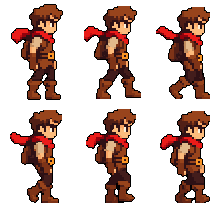
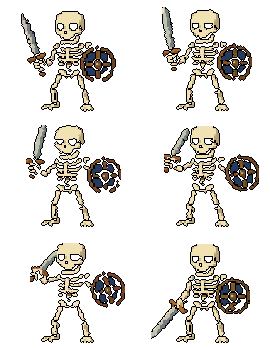

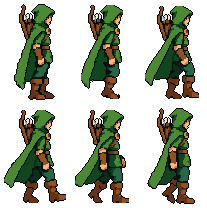
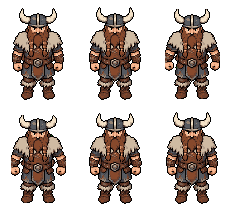

 →

On the skeleton attack we switched off two frames where the shield smeared mid-swing. That takes one click each, and the swing still reads. More on animating a sprite from an image, the pixel art animation generator and the walk cycle generator.
Why video tools aren't sprite-ready
General video generators can make a lovely few seconds of a character moving. In our testing that clip is still a long way from a sprite:
- The character drifts. Proportions, colours and details change from frame to frame.
- There's a background. You have to cut it out of every frame, and the edges leave halos.
- No pixel grid. Edges come out soft and the palette runs to thousands of colours.
- The camera moves. Pans and zooms mean the feet never sit in the same place twice.
Sprite animation tools exist to fix exactly that: same scale, same anchor, a limited palette and a transparent background in every frame.
Where SpriteLab is weaker
- No skeleton rig or preset library. You describe the motion in words, or give start and end poses. PixelLab gives joint-level posing, and Ludo.ai and God Mode AI have big action libraries.
- Not the cheapest per animation. On Ranger an animation works out at about 40 cents. Retro Diffusion charges 10 to 25 cents with no plan.
- One motion per call. A move set of six motions is six calls, where SpriteCook sells the set as the product.
- Size caps. Sprites up to 256 px (320 on Pro), with an aspect ratio between 1:2 and 2:1.
- Big moves take more tries. Idles and walks land most often. Attacks and spells go better on Pro, and you may still switch off a smeared frame.
What to check before you pay
- It animates your sprite, not a lookalike. Upload your own art and see if it comes back recognisably the same.
- The same palette in every frame. Colours that flicker between frames look like noise in game.
- Feet that stay put. A stable anchor, or the character slides when the loop plays.
- A real transparent background. Halos show up against dark levels.
- Free fixes. Can you drop a bad frame or change the outline without paying again?
Got a sheet from any tool and want a quick preview? The free sprite sheet to GIF tool plays it in the browser. For sheet types beyond animation, see the best AI sprite sheet generators, and for still sprites, the best AI pixel art generators.
Frequently asked questions
What is the best AI for sprite animation?
For pixel art games, SpriteLab: upload your own sprite (or make one there), describe the motion, and get a looping sprite sheet and a GIF that keep your sprite's palette and outline, with free frame trimming and cleanup afterwards. PixelLab gives the most hands-on control through skeleton posing, Retro Diffusion is the cheapest way to animate a few sprites with no subscription, SpriteCook sells full move sets with engine files, and Ludo.ai has the biggest preset library. We make SpriteLab, so test them on your own sprite.
Can AI animate a pixel art sprite?
Yes. Sprite animation tools take one sprite and a short description of the motion (idle, walk cycle, sword swing) and return the frames as a sprite sheet. The good ones keep the sprite's colours and outline from frame to frame and give you a transparent background. Expect to drop the odd bad frame, and expect attacks and spells to need more tries than idles and walks.
How many frames should a walk cycle have?
Eight is the usual number and SpriteLab's default: enough for a smooth stride without a huge sheet. Small sprites read fine at 4 or 6 frames, and slow, heavy walks can go up to 12 or 16. Keep the count even so the two halves of the stride match.
How do I animate a sprite with AI?
In SpriteLab, open Animate, upload a PNG of your sprite with a transparent or plain background, pad the canvas if the motion needs room, and describe the motion in a few words, such as "walk cycle facing right". You get a horizontal sprite sheet and a GIF. Switch off any frame you don't want, then download the sheet, the GIF or single frames. To animate between two poses, use START → END and upload a start pose and an end pose.
Is there a free AI sprite animation generator?
Most tools let you try for free, but animation is where the free credits run out fastest. SpriteLab's free plan gives 25 credits plus 5 a day and an animation is 20, so it is for trying things rather than animating a cast. Paid plans start at Ranger, $7.99 a month. Retro Diffusion gives new accounts a $0.50 balance and charges per animation, and SpriteCook gives 40 free credits a month. SpriteLab's sprite sheet to GIF tool is free with no account.
Can I use a video generator to animate a sprite?
You can make a clip, but in our testing it isn't a usable sprite. General video tools drift the character between frames, leave a background behind, blur the pixel edges and often move the camera. You would have to cut frames, remove the background and redraw every frame onto a pixel grid before an engine could use it. Sprite animation tools do that part for you.
Animate your own sprite
Upload a PNG or make one, describe the motion, and get a sheet and a GIF in your sprite's own colours.
ANIMATE A SPRITE An animation is 20 credits. Paid plans from $7.99/mo.