Custom size sprite generator
Your game has a 32x48 hero, a 20x60 street lamp and a 128x48 train. A square canvas fits none of them. Exact size takes the width and height you type, anything from 16 to 128 px a side, and draws the sprite at exactly that size: one art pixel per image pixel, transparent PNG.
PICK YOUR SIZE Paid plans from Ranger. 8 credits a sprite.
Pixel art at any size, 16 to 128 px
The rules are short:
- Width and height can each be anything from 16 to 128 px.
- The long side can be at most 4 times the short side. 32x128 works, 16x128 doesn't.
- Above 64 px, odd sizes round up to even, so a 97 px side becomes 98.
- The PNG is final. There's no resize afterwards, so pick the size your game needs before you generate.
Shapes that fit real games
- Tall characters: 32x48 or 48x64, so a hero is a tile wide but taller than a tile.
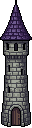
- Tall props: street lamps, doors, banners, towers. Think 20x60 or 32x128.
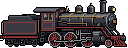
- Wide things: vehicles, boats, crocodiles, fallen logs. 128x48, 96x64, 64x24.
- In-between squares: 24x24 or 40x40 when your grid isn't a power of two.
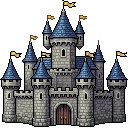
- Big set pieces: up to 128x128 for castles and bosses.
How it works
- Open Text to Sprite and choose the Exact size tile.
- Type the width and height, say 20 and 60, and describe the sprite.
- Generate. After about 15 to 30 seconds you download a PNG at exactly that size.
Sprites at odd sizes
All shown at 2×, so you can compare their sizes honestly. Each caption is the real file size.


Prompting tips for odd shapes
- Match the words to the shape. A 20x60 canvas wants "a tall iron street lamp", not "a street lamp on a corner at night".
- Say the view. Vehicles and long creatures work from the side. Buildings suit a three-quarter view.
- Size characters to your tile grid. On a 32 px grid, 32x48 gives a hero one tile of width and a tile and a half of height.
- Leave room for what sticks out. A bow, a sword or a tail needs width. That's why the goblin archer is 48x64 and not 32x64.
- One subject per sprite. 128x48 is wide, but a train and a station are still two sprites.
When a square is enough
If you only need squares from 16 to 64 px, Micro is cheaper: from 3 credits, with a closed 1px outline. For the two most common squares in Exact size, see the 32x32 and 64x64 sprite generator pages.
Price and plans
8 credits a sprite. Exact size is on every paid plan from Ranger up. Ranger is $7.99 a month with 400 credits, enough for 50 Exact size sprites, and Knight, Paladin and Dragonlord give you more. Free accounts can't use it.
API and MCP
The same feature is on the REST API as POST /api/v1/exact-size (API docs) and on the MCP server as exact_size_sprite (MCP docs). Handy when an agent is building your game and needs a 20x60 lamp, not a big square with a lamp somewhere in it.
Frequently asked questions
What sizes can I make?
Any width and any height from 16 to 128 px. The long side can be at most 4 times the short side, so 32x128 works and 16x128 doesn't.
Why did my 97 px side come out at 98?
Above 64 px, odd sizes round up to the next even number. Ask for an even size over 64 and you get exactly what you typed.
Can I change the size after it's generated?
No. The PNG is final and there's no resize step. Decide the size your game needs first, then generate.
How long does a sprite take?
About 15 to 30 seconds.
How much does it cost?
8 credits a sprite, on every paid plan from Ranger up. Ranger is $7.99 a month with 400 credits. Free accounts can't use Exact size.
Can a coding agent use it?
Yes. The REST API has POST /api/v1/exact-size and the MCP server has an exact_size_sprite tool, so an agent can ask for a 20x60 lamp or a 128x48 train directly.
Make a sprite at your size
Pick Exact size, type any width and height from 16 to 128, and describe one thing.
PICK YOUR SIZE Paid plans from Ranger. 8 credits a sprite.